Categories for browsers
September 8, 2010 4:04 am
Published by tnels
I’ll admit that I haven’t done a lot of actual development for mobile browsers (mostly I’ve done user experience design, visual design, and usability). But this week I ran into a “fun” little loading error with Mobile Safari on the iPhone, iPad, and iPod Touch.
Apparently, Mobile Safari doesn’t like images (PNG, GIF, and JPG) larger than 3 megapixels (3 * 1024 *1024). This means any background image you want to show up on Mobile Safari needs to be height * width ≤ 3145728. This is only valid for iOS 3.0 (for below 4.0 is it okay to refer to it as iOS?) and above. Less then 3.0 can only handle 2 * 1024 * 1024.
So my 7900 x 1000 image needs to slimmed down a lot.
The reason I ran into this issue is that the client has many IE6 users and needs to fit their needs. His design is very nice, but has a lot of rounded corners and drop shadows. Rather than write two versions of the site, I’ve been making really large background areas in the sprite to avoid any potential issues with IE6.
I think I got a little heavy handed with this and didn’t create empty header and footer divs in the markup for just the bottom and top images, which I’ll be doing to solve the problem now. I am not terribly comfortable with this. The purist in me hates mark-up that has no real bearing on the content. Another solution would probably have been code a CSS3 version with rounded corners and had fallbacks for IE and non CSS3 compatible browser versions.
Thanks to the following articles for helping me fully understanding this issue more and come up with an appropriate solution:
March 19, 2009 10:48 pm
Published by tnels
Internet Explorer 8 came out today. The office was all a buzz, most of the conversations revolved around its lack of CSS3 support and whether or not it should start in “Standards Mode”. While all of these are valid discussions, they fail to recognize that Microsoft finally did it right for once. They built a browser that supports all current standards.
I was in the CSS3 panel at SXSWi on Sunday afternoon, and there were 3 companies on the panel: Mozilla, Opera, and IE. When the IE guy came up to speak, the first thing he said was, “I am not here to talk about IE and CSS3.” He went on to explain how IE8 had passed every test out there and was fully compliant with CSS2.1. And you know what happened? People applauded. They were friggin elated. I was expecting people to boo this poor guy out of the room. His message was really that IE is in the present now, and because of that, we can all move into the future together.
I think Microsoft is tired of being the whipping boy of the internet and is ready to be open with the web developer community at large, not just those that use their products. One of the major factors in the IE’s inability to move forward was being able to support old products that Microsoft had made in 90s, and I think they finally realized the segment of society still using those products has really shrunk. Oh, and their constantly shrinking market share.
While Microsoft may be moving in the right direction, they haven’t forced everyone to upgrade yet. IE8 is only available via download direcly from the IE website. And for those of you reading this right now who can upgrade, please do so (here). Otherwise, you might be seeing this in your browser the next time you come back.
April 5, 2008 10:02 am
Published by tnels
Okay, so I have finally gotten to this post. I guess I took the whole week off. I gotta be more disciplined. Anyway…
One thing that angered me about Safari 3.1 was its @font-face support. This allows developers to load fonts that may not already be on someone’s computer and use them anywhere in the site. This could be a totally awesome tool, however, I thought, “Why the hell is Safari trying to become IE?”
What do I mean by that statement? Well, the reason the IE sucks to develop for is because it is too busy trying to support older websites that don’t gracefully degrade. The developers were too busy trying to get the site to work in a patched together browser, so standards weren’t followed. This comes from the fact that IE attempted to create it own standard (as did Netscape) because they were all attempting to monopolize the internet.
Anyway, so we have Safari attempting to, in my view, add its own specification to CSS. Turns out I’m wrong. The @font-face selector is actually a part of the CSS3 spec. However, CSS3 is not fully “approved” even though it is supported. I’m not really sure how that works, but I’d really like to see some definite approval before we see support.
So I guess @font-face is all good. Soon we’ll be seeing websites in font other than Arial, Verdana, Tahoma, Trebuchet MS, Georgia, Times, and fantasy? Almost. Turns out you have to host the font files on your server, in a readable directory, so you can’t put up commercial fonts because all users will have to do is read your CSS (thanks Firebug!) and navigate to the font file and download it. Not good. So we are stuck with Open Type fonts. Which can be good, and are getting better, but they’re no Din.
But wait there’s more! You can load other fonts with this handy little tool known as sFIR. sFIR is awesome because it replaces your headings with Flash files that have the font’s embedded. It gracefully degrades (if someone doesn’t have Flash, they get the heading in your default font style). It also has limitations. sFIR is no intended to be used for mainbody text, only small chunks, like headings. And the person needs Flash (who doesn’t have it now-a-days?).
For more on @font-face and how it works, check out this @font-font explanation.
March 25, 2008 2:27 pm
Published by tnels
This is hands down the issue that will covert me to using Safari. I live and die by Firebug at work. It has so many applications, the most amazing of which is the ability to edit styles and see live updates without switching between programs. Plus you get to see all your CSS properties right next to each other, so if you over somehow over-ruling a style you can see how best to go about fixing your problem. Plus you got the DOM right there to help your JavaScript.
So now this feature comes built in. Here’s how to enable the Safari develop menu.
It works pretty similar to how Firebug does, however, there is some additional coolness/drawbacks.
What’s the same
It starts as a menu item, but of you hit option + command + i, you get a pop-up version of the Web Inspector (of you can go to the Develop menu and select Show Web Inspector). Firebug begins in the same window as the page you are, but you can open it in a separate window after that. Starting in a separate window is nice because you can see the whole page without any obstruction, but you can always click the bottom right hand corner to open the Inspector in the same window. I should point out that there is no button to close the Inspector once it is in the same window was the page, which totally blows (and even the option + command + i shortcut doesn’t close it).
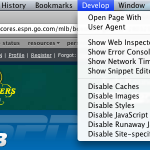
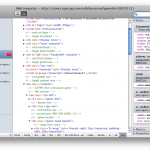
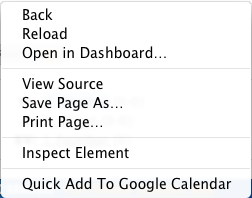
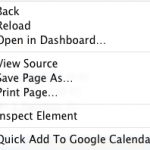
Another great feature is the “Inspect Element” option. If you right click on element, you will see it at the bottom of the option menu. This is another feature borrowed from Firebug.
They both have features that let you get into the DOM, they just have different titles. In Firebug, its called “DOM”. In Web Inspector, DOM properties are found under “Properties”. I think this is Apple’s subtle way of merging the way people thing about HTML and JavaScript (as two separate languages) into one unified structure. While they both do separate things and operate as separate languages, there really isn’t much difference when it comes to the end user. Plus one (JavaScript) is generally useless with out the other (HTML).
What’s Different
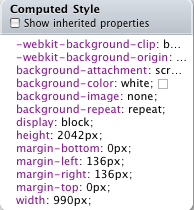
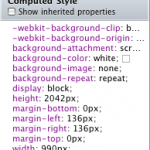
When it comes to styles, you get sort of the same treatment, you can see all the styles for a given element, as they broken down by CSS properties. Web Inspector gives you a nice feature by listing all the applied styles first, regardless of where the property is coming from, and then it lists them by selector. However, you cannot edit this “Computed Style”; you have to scroll down some more and find the real style.
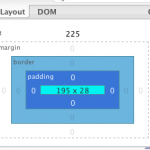
Another main difference between Firebug and the Web Inspector is when an element is highlighted (or inspected). Firebug has a color coded system, so you can see the element size (in blue), the padding (in purple), the border (in grey), and the margin (in yellow).


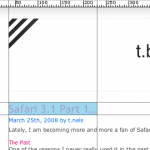
Web Inspector grays out the screen, except for the element, so you can really focus in on it. But you are missing the box model elements, which can come in handy.

Layout vs. Metrics
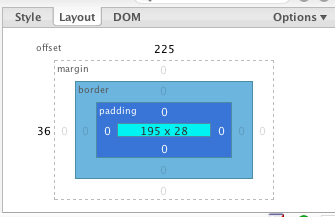
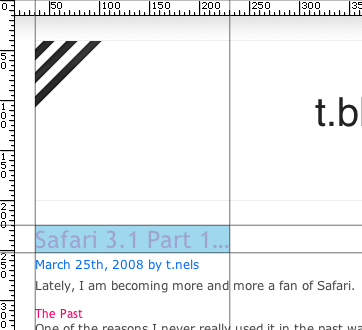
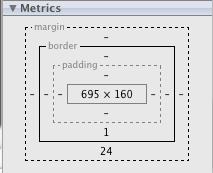
They both a way of breaking down the box model in useful terms, but I still like the Firebug implementation. Firebug has what it calls “Layout” which shows all the measurement applied by the box model (including offset), and when you mouse over one of them, overlays a ruler for the X and Y on your site and shows you where your boundaries lie within that. This can be great for aligning elements, and helping improve typography.
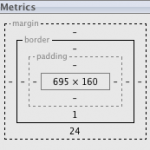
Web Inspector has what it calls “Metrics”, but it stops there. It does show you all the measurements of the block but it lacks to in browser display you get with Firebug.
General look and feel
Firebug goes for a tabbed layout, so everything works similar to how your browse. Web Inspector goes in a different direction and breaks each file down by type, and allows you to access them in this way.
It basically reinforces the Aqua branding of Safari and borrows lots of its style from other Aqua interfaces. I kinda like this because Apple has a great approach to Usability. It does reinforce to the user that all of these styles come from different files, but in the end get put together by the browser. Firebug breaks everything down by type, but doesn’t necessarily draw the distinction (at least not directly) of where all this info is coming from.
Browser Defaults
This is a key component, especially for people who are learning, and it is found only in Web Inspector, and that is browser defaults. Web Inspector gives the user the ability to enable “Show Inherited Properties” which shows the user the browser defaults for each element. For a web developer this is crucial. I think the IE7 developer tools attempts this, but still doesn’t let you know about the 2 pixels of hidden border (I highly recommend “border-collapse:collapse;” make it into every stylesheet you create).
This does let you know about how Safari interprets everything, which I like because there are a few things that Safari interprets a little differently than I am used to. Standards compliance is a scary thing. Because it means you will actually get what you want.
Conclusion
Overall, I haven’t had a ton of experience with the Web Inspector yet, but I do like where it is going. Soon it will be on par with Firebug, and maybe surpass it. But until then Firebug is awesome, and I’m loving that browsers are adding built-in development tools, for lazy developer trolls like myself.
Next up, Part 3, Why Apple pissed me off with 3.1…
March 25, 2008 9:52 am
Published by tnels
Lately, I am becoming more and more a fan of Safari.
The Past
One of the reasons I never really used it in the past was because it was just a browser, and, as a developer, while testing in it was necessary, I would never actually use it while I was setting things up. Here are some more reasons I never used it:
- I support Firefox for everything they have done to kill IE
- Camino does the same stuff (and is getting better at it all the time)
- Only one theme/skin
- I really enjoy live bookmarks instead of RSS aggregators
- Sometimes Javascript can be a pain (ever use tinyMCE?)
- Web Developer toolbar
- Firebug
The Present
But now that is changing.
- Its fast
- Safari now supports RSS feeds in the browser, still no live bookmarks, but its a start.
- I’ve fallen in love with Aqua, and I don’t mind the look of Safari in Leopard (but I think some of the buttons are a little large and awkward).
- Firefox is becoming a slow beast that is killing my browsing experience, but I’m really excited about 3.0. I have a whole other post brewing about what went wrong with Firefox.
- Camino is still there, but for some reason, it just not exciting anymore.
- Last but certainly not least… Safari has a Develop Menu in the Toolbar!!!!! Its not as advanced as Firebug (yet) but it gives an amazing amount of depth into how Safari renders everything, which is useful (and awesome!)
Stay tuned for more on the Develop Menu in Part 2…